
Nuestro generador de imágenes a video con IA utiliza aprendizaje automático avanzado para analizar la foto que subiste y transformarla en un video dinámico. Simplemente sube tu imagen, elige tus preferencias como duración, resolución y tamaño, y la IA creará un video corto con movimiento fluido y efectos. Es fácil de usar y no se requieren habilidades de edición.
Free AI Image to Video Maker
Instantly turn image to video with AI! One-click creation, custom duration, resolution & size.
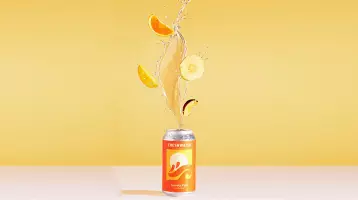
Prompt
Shot 1: Two oranges collide in mid-air, capturing the moment of impact. Water splashes everywhere, creating a dynamic and vibrant scene. The bright sunlight reveals the juicy interior of the oranges. The orange-red metal can falls in slow motion against a cinematic gradient background, transitioning from warm orange to deep orange-red, full of depth and atmosphere. The addition of splashing soda liquid, luminous reflections, and a trail of mist behind the can creates a dramatic lighting effect. The slightly tilted camera, combined with shallow depth-of-field blur, creates a powerful and high-energy opening visual impact. Shot 3: A close-up of the upper part of the orange-red metal can shows shimmering water droplets. The can slowly rotates, the droplets flowing with it. Against a hazy, light orange background, shimmering light spots create a dynamic and captivating scene as the soda can rotates gracefully in the light and shadow, the water droplets sparkling and flowing. Scene 4: The camera follows a slender hand as it picks up an orange-red metal can. The background is a vibrant gradient, transitioning from warm orange to deep orange-red. Water droplets slide off the can's surface as it is placed on a reflective, damp table. The camera slowly circles the can, focusing on the glossy effect of the water droplets and the orange pattern, finally ending with the can's reflection.
Image To Video
Imagen a Video AI Gratis
¿Quieres hacer un video rápido? Convierte fácilmente imágenes en videos con nuestra herramienta de IA. Personaliza con mensajes únicos, crea clips de 4s o 8s y disfruta de claridad 1080p: ¡convierte imágenes en videos dinámicos rápidamente!
Crear Video Ahora
Característica
Convierte Foto a Video con Pixnova AI - Gratis y Fácil
Desbloquea la creatividad con nuestra herramienta impulsada por IA: convierte imágenes en videos dinámicos sin esfuerzo, ¡perfecto para redes sociales y más!
Fácil de Usar, Gratis y Listo para Compartir en Redes Sociales
Convierte tus fotos en videos sin esfuerzo y gratis con nuestra herramienta fácil de usar. No se requieren habilidades técnicas. Una vez que tu video esté listo, puedes compartirlo instantáneamente en plataformas de redes sociales como Facebook, Instagram o TikTok sin complicaciones, asegurando que tus creaciones lleguen a una amplia audiencia.
Crear Video Ahora
Creatividad Ilimitada con Poderosa IA
Desbloquea infinitas posibilidades creativas con nuestra poderosa herramienta de foto a video impulsada por IA. Simplemente sube tu imagen, ingresa tu mensaje y deja que la IA transforme tu foto estática en un video dinámico. Este proceso fluido es perfecto para anuncios comerciales, permitiendo a las empresas crear videos cautivadores y de aspecto profesional en poco tiempo.
Convertir Foto a Video
Crea Videos a Partir de Imágenes de Personajes Específicos
Ya sea que estés trabajando con fotogramas de películas, animación o tus propios bocetos originales, nuestra plataforma te permite dar vida a imágenes de personajes específicos. Transformar tus personajes en videos atractivos, mejorando sus historias y asegurando una presencia consistente en diferentes escenas o entornos.
Hacer Animación Ahora
Accede a Millones de Imágenes de Stock de Alta Calidad para Tus Videos
Mejora tus creaciones de imagen a video con más de 16 millones de fotos de stock de alta calidad de proveedores líderes como iStock, Shutterstock y Adobe Stock. Cambia fácilmente tus imágenes por imágenes de stock de calidad profesional para crear videos impresionantes que se vean pulidos y dinámicos, perfectos para todos tus proyectos creativos.
Cambiar Imagen a Video
Por qué elegir la herramienta de imagen a video de Pixnova AI
Prueba gratuita y acceso fácil
Disfruta de una prueba gratuita y comienza a convertir fotos en videos al instante. Sin tarifas ni pasos complicados, solo acceso fácil a potentes herramientas de creación de videos.
Privacidad y seguridad de datos
Tu privacidad es importante. Protegemos tus datos con seguridad y encriptación de primer nivel, asegurando una experiencia de creación de videos segura y sin preocupaciones.
Opciones de video flexibles

Elige entre duraciones de video de 4s o 8s, 3 opciones de resolución y 4 tamaños de video para personalizar tus videos para cualquier plataforma o necesidad.
¿Cómo crear videos a partir de imágenes con Pixnova AI?
Convierte tus fotos en videos impresionantes con Pixnova AI - ¡Rápido, fácil y gratis!
1
Sube tu imagen
Ya sea una imagen de alta calidad de un sitio web de fotos de stock, un boceto hecho a mano o una foto que tomaste tú mismo, simplemente súbela a nuestra herramienta.
2
Ingresa el aviso de descripción
Escribe una descripción de la persona, objeto o efecto que deseas mostrar en el video. Esto ayudará a la IA a entender y crear el video basado en tu visión creativa.
3
Elige la configuración del video y genera
Selecciona duración, resolución y tamaño, o elige las configuraciones predeterminadas. Haz clic en generar, espera unos segundos y luego descarga y comparte.
¡Convierte tus imágenes en videos impresionantes al instante!
Creación de videos fácil, divertida y rápida
Crear videos con Pixnova AI es increíblemente simple y divertido. Solo ingresa tu idea y la herramienta hace el resto. Puedes editar fácilmente tu video con indicaciones intuitivas, lo que lo convierte en la opción ideal para cualquiera que quiera dar vida a su visión creativa sin complicaciones.
@Johnny
Pixnova AI es perfecto para cualquier proyecto, ya sea para redes sociales, presentaciones o uso personal. Es un cambio de juego para los creadores de contenido.
@Emily
¡Pixnova AI es increíble para convertir fotos en videos sin esfuerzo, ideal para redes sociales, presentaciones o proyectos personales!
Preguntas frecuentes sobre Pixnova AI imagen a video
Encuentra respuestas rápidas y claras para ayudarte a aprovechar al máximo nuestra herramienta de imagen a video con IA.