
私たちのAI画像から動画への生成ツールは、高度な機械学習を使用して、アップロードされた写真を分析し、動的な動画に変換します。画像をアップロードし、時間、解像度、サイズなどの好みを選択するだけで、AIが流れるような動きと効果を持つ短い動画を作成します。編集スキルは不要で、簡単に使えます。
Free AI Image to Video Maker
Instantly turn image to video with AI! One-click creation, custom duration, resolution & size.
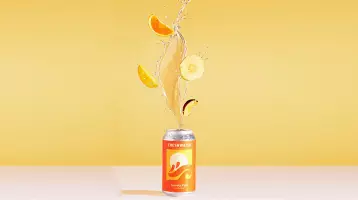
Prompt
Shot 1: Two oranges collide in mid-air, capturing the moment of impact. Water splashes everywhere, creating a dynamic and vibrant scene. The bright sunlight reveals the juicy interior of the oranges. The orange-red metal can falls in slow motion against a cinematic gradient background, transitioning from warm orange to deep orange-red, full of depth and atmosphere. The addition of splashing soda liquid, luminous reflections, and a trail of mist behind the can creates a dramatic lighting effect. The slightly tilted camera, combined with shallow depth-of-field blur, creates a powerful and high-energy opening visual impact. Shot 3: A close-up of the upper part of the orange-red metal can shows shimmering water droplets. The can slowly rotates, the droplets flowing with it. Against a hazy, light orange background, shimmering light spots create a dynamic and captivating scene as the soda can rotates gracefully in the light and shadow, the water droplets sparkling and flowing. Scene 4: The camera follows a slender hand as it picks up an orange-red metal can. The background is a vibrant gradient, transitioning from warm orange to deep orange-red. Water droplets slide off the can's surface as it is placed on a reflective, damp table. The camera slowly circles the can, focusing on the glossy effect of the water droplets and the orange pattern, finally ending with the can's reflection.
Image To Video
無料のAI画像から動画
素早く動画を作りたいですか?私たちのAIツールを使って簡単に画像を動画に変換できます。ユニークなプロンプトでカスタマイズし、4秒または8秒のクリップを作成し、1080pの鮮明さで画像をダイナミックな動画に素早く変えましょう!
今すぐ動画を作成
特徴
PixNova AIで写真を動画に変換 - 無料で簡単
私たちのAI駆動ツールで創造性を解き放ち、画像をダイナミックな動画に effortlessly 変換し、ソーシャルメディアやそれ以上に最適です!
使いやすく、無料、ソーシャルメディア共有に最適
私たちの使いやすいツールで、あなたの写真を簡単に無料で動画に変換できます。技術的なスキルは不要です。動画が準備できたら、Facebook、Instagram、TikTokなどのソーシャルメディアプラットフォームで瞬時に共有でき、あなたの作品が広いオーディエンスに届くことを保証します。
今すぐ動画を作成
強力なAIで無限の創造性
私たちの強力なAI駆動の写真から動画へのツールで、無限の創造的可能性を解き放ちましょう。画像をアップロードし、プロンプトを入力するだけで、AIが静止画をダイナミックな動画に変換します。このシームレスなプロセスは商業広告に最適で、企業が魅力的でプロフェッショナルな動画を短時間で作成できます。
写真を動画に変換
特定のキャラクター画像から動画を作成
映画のスチル、アニメーション、またはあなた自身のオリジナルスケッチを使用している場合でも、私たちのプラットフォームは特定のキャラクター画像を生き生きとさせることができます。キャラクターを魅力的な動画に変換し、物語を強化し、異なるシーンや環境で一貫した存在感を確保します。
今すぐアニメーションを作成
動画用の高品質なストック画像を数百万点利用
iStock、Shutterstock、Adobe Stockなどのトッププロバイダーからの1600万点以上の高品質なストック写真で、画像から動画の作成を強化しましょう。プロフェッショナルなストック画像と簡単に入れ替えて、洗練されたダイナミックな動画を作成し、すべてのクリエイティブプロジェクトに最適です。
画像を動画に切り替える
なぜPixNova AI画像からビデオツールを選ぶべきか
無料トライアルと簡単アクセス
無料トライアルを楽しみ、写真をビデオに瞬時に変換を始めましょう。手数料や複雑な手順は不要で、強力なビデオ作成ツールに簡単にアクセスできます。
プライバシーとデータセキュリティ
あなたのプライバシーは重要です。私たちは最高レベルのセキュリティと暗号化であなたのデータを保護し、安全で安心なビデオ作成体験を保証します。
柔軟なビデオオプション
4秒または8秒のビデオ長、3つの解像度オプション、4つのビデオサイズから選択して、あらゆるプラットフォームやニーズに合わせてビデオをカスタマイズできます。
PixNova AIで画像からビデオを作成する方法は?
PixNova AIであなたの写真を素晴らしいビデオに変えましょう - 速く、簡単、そして無料!
1

画像をアップロード
ストックフォトサイトからの高品質な画像、手描きのスケッチ、または自分で撮った写真など、単にツールにアップロードしてください。
2
説明プロンプトを入力
ビデオで紹介したい人物、物体、または効果の説明を書いてください。これにより、AIがあなたのクリエイティブビジョンに基づいてビデオを理解し、作成するのに役立ちます。
3
ビデオ設定を選択して生成
期間、解像度、サイズを選択するか、デフォルト設定を使用します。生成をクリックし、数秒待ってからダウンロードして共有しましょう!
あなたの画像を瞬時に素晴らしいビデオに変えましょう!
簡単で楽しく、迅速なビデオ作成
PixNova AIを使ったビデオ作成は非常にシンプルで楽しいです。アイデアを入力するだけで、ツールが残りを行います。直感的なプロンプトで簡単にビデオを編集できるため、手間なくクリエイティブビジョンを実現したい人に最適です。
@ジョニー
PixNova AIは、ソーシャルメディア、プレゼンテーション、または個人使用のためのプロジェクトに最適です。コンテンツクリエイターにとってのゲームチェンジャーです。
@エミリー
PixNova AIは、写真を簡単にビデオに変換するのに素晴らしいです - ソーシャルメディア、プレゼンテーション、または個人プロジェクトに最適です!
PixNova AI画像からビデオに関するFAQ
私たちのAI画像からビデオツールを最大限に活用するための迅速で明確な回答を見つけてください。